Everything your checkout needs, at one price
A Shopify-style checkout for WooCommerce, with order bumps, a side cart and abandoned cart recovery built in.
Backed by our 30-day refund policy. Try a demo.
1 Site
$
249
/ year
For a single WooCommerce store.
1 live store
Free on staging and local sites
1 year of updates and support
Renews yearly, cancel any time
3 Sites
$
349
/ year
Add two more stores for $100 more than 1 Site.
Up to 3 live stores
Free on staging and local sites
1 year of updates and support
Renews yearly, cancel any time
1 Site – Lifetime
$
899
once
One payment, no renewals. Costs less than four years of 1 Site.
1 live store
Free on staging and local sites
Updates and support included
No renewal payments
Included in every plan, with no paid add-ons:
Works with over 100 plugins, 30 payment gateways and 40 themes. Have a specific setup? Ask us before you buy. Address autocomplete and validation need your own Google, Fetchify or Smarty key.
CheckoutWC Lite $0 The Midas template and multi-step checkout, free on WordPress.org.
Install free →10 Sites
$
499
/ year
For small agencies and multi-store brands.
Up to 10 sites
Use on client stores
Move activations between stores
Free on staging and local sites
1 year of updates and support
Renews yearly, cancel any time
25 Sites
$
899
/ year
For agencies with a growing client list.
Up to 25 sites
Use on client stores
Move activations between stores
Free on staging and local sites
1 year of updates and support
Renews yearly, cancel any time
50 sites
$
1,499
/ year
For agencies at scale, with hands-on help from our team.
Everything in 25 Sites, and…
Up to 50 sites
Onboarding call
Priority support, with your tickets answered first
Quarterly check-in with our developers
Early access to new features
Included in every plan, with no paid add-ons:
Works with over 100 plugins, 30 payment gateways and 40 themes. Have a specific setup? Ask us before you buy. Address autocomplete and validation need your own Google, Fetchify or Smarty key.
Managing more than 50 sites? Contact us and we’ll work out a plan together.
Want clients to own their license? Join our affiliate program and earn commission when they buy through your link.
Reviewbird discount
Reviewbird automates everything you need to collect more product reviews: automated review requests, photo and video reviews, AI moderation tools, and much more. Get a discount for as long as you subscribe. Cancel anytime.

Express checkout
Offer express checkout options at checkout. (Requires a gateway that supports Express Checkout)

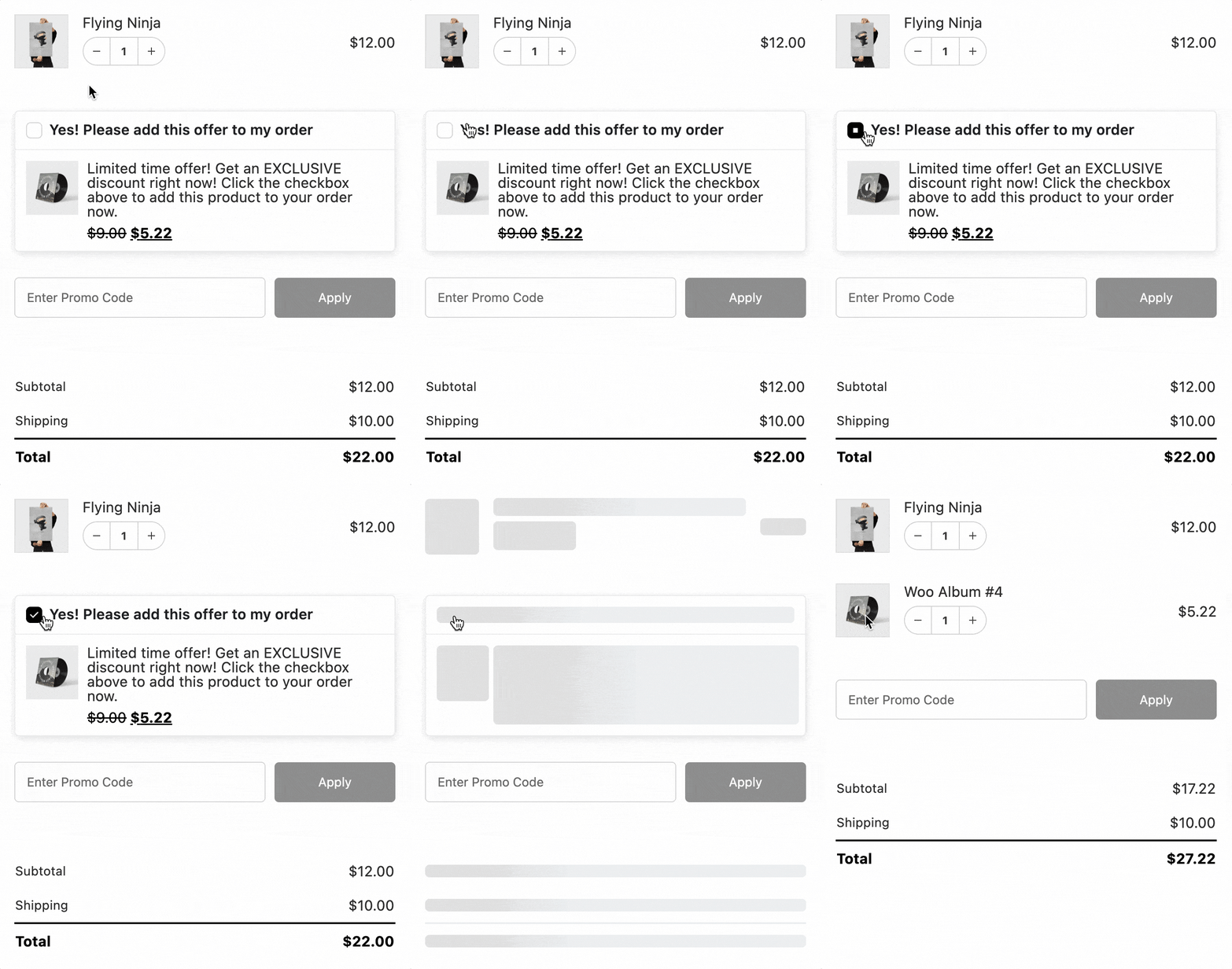
Order bumps and upsells
Provide special offers to customers based on what is in their cart:
Order Bumps are situational and may affect conversions negatively, so we encourage merchants to thoughtfully consider how to best leverage them and pay careful attention to their analytics data.
Show them in 16 positions on the checkout page, in the side cart, in a pop-up when the shopper clicks the place order button, or as a post-purchase offer. Order bumps also support variable products.
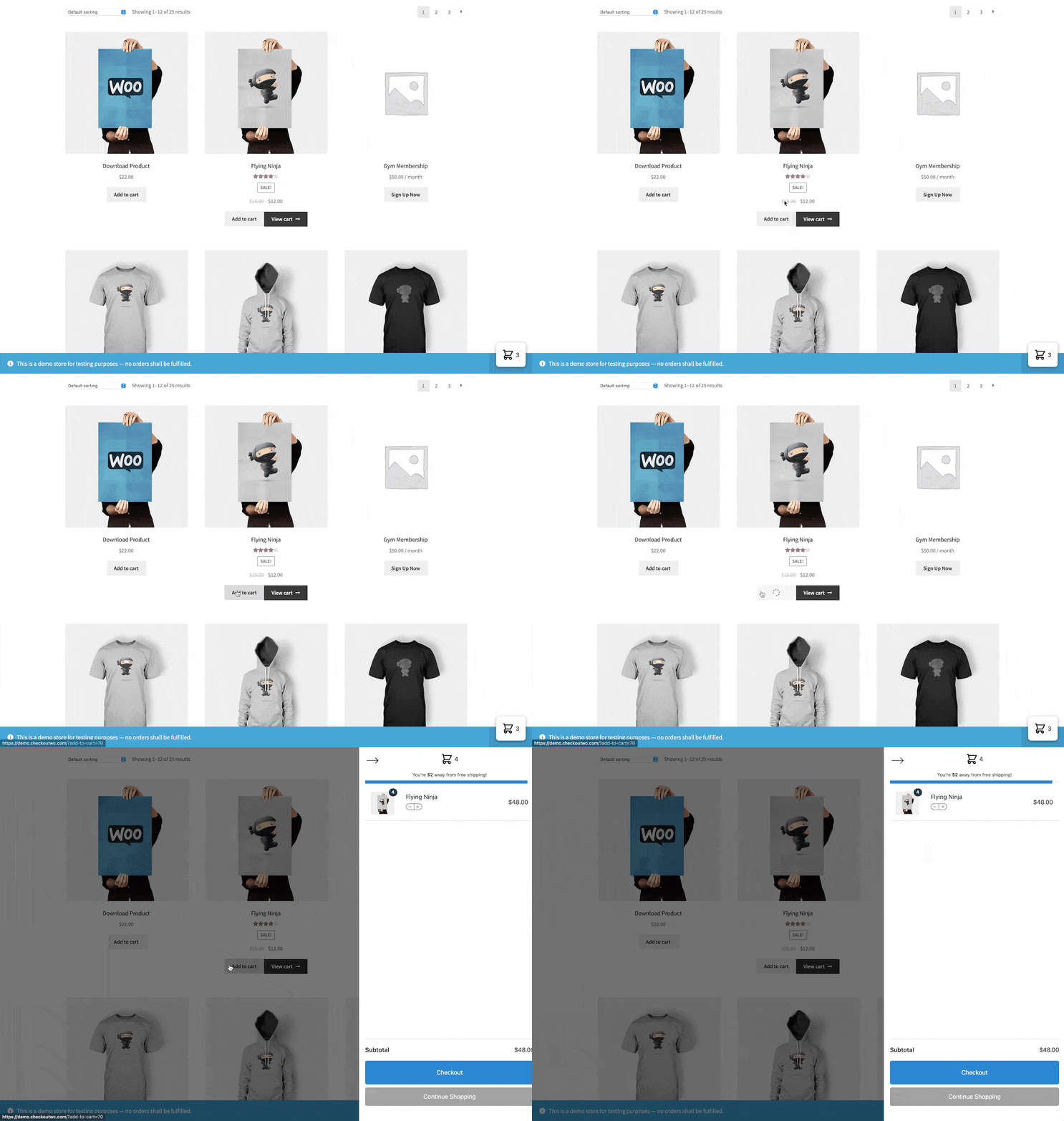
Side cart with free shipping bar and upsells
A complete cart page replacement.
Supports free gift with purchase, free shipping rewards, and a Suggested Products Carousel in your side cart!
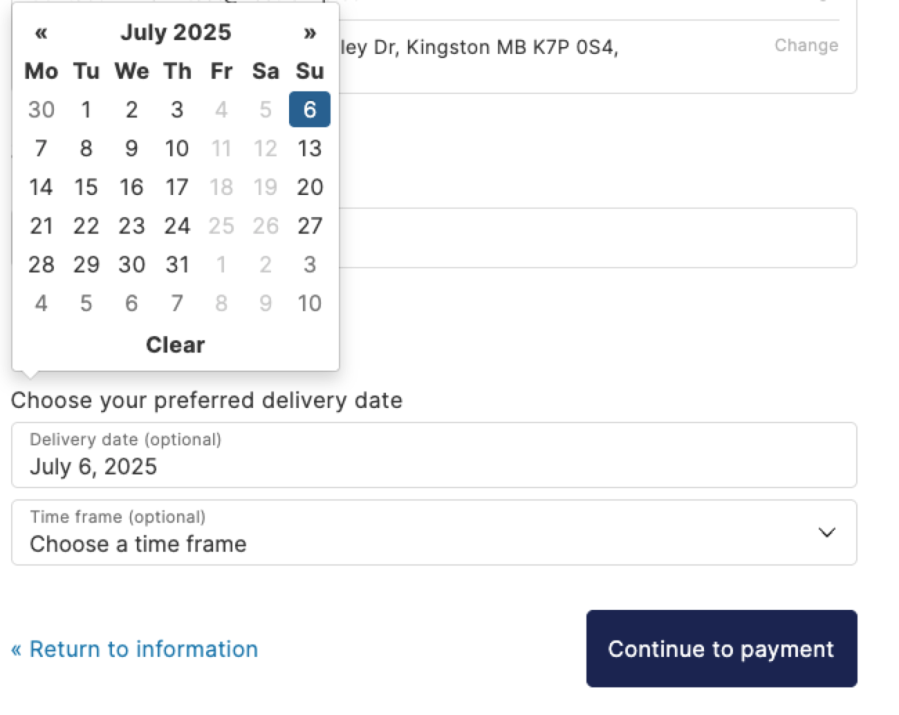
Order Delivery for WooCommerce included ($149 value)
Advanced pickup and delivery toolset included for free with your license. Adds:
- Date and timeslot picker at checkout
- Per-day and per-slot capacity limits
- Cutoff rules by day and time
- Blockout dates and holiday schedules
- Fees for premium dates/slots
- Rules per shipping method/zone
- Local pickup and delivery workflows
- Tipping functionality for delivery
- WooCommerce Subscriptions & Constellation: calculates renewal deliveries
Kind Words
Happy Customers
“Excellent plugin! We’ve seen a lift in conversion rate, their support team is super responsive and helpful and the checkout looks great!”

Ivan Rodriguez – iHeartDogs.com
“Our sales increased significantly since we implemented the checkout page. We are now trialling the side cart and that is working really well so far also. The support is very quick too!”

John K – Hairshop
“Very happy with Checkout WC! Many of our customers are 60+ in age, so they need something clear and simple to avoid confusion. I no longer get emails and calls from uncertain customers trying to check out. This plugin is easy to use and looks so much more professional/streamlined than the WooCommerce default checkout page.”
“CheckoutWC is an outstanding tool for optimizing the checkout process on WooCommerce. As a service provider working with multiple clients, I’ve seen a significant improvement in conversion rates thanks to its intuitive and seamless interface. It simplifies the user experience, reduces cart abandonment, and integrates perfectly with WooCommerce. Additionally, its advanced customization options allow tailoring the checkout to each client’s specific needs. I highly recommend it to maximize the performance of online stores!”

Artur Hoogers – TRAGG
“As an agency we use CheckoutWC on several sites. We can honestly say this is by far the best checkout page upgrade you can get … Easy installation, good documentation and a very good UI.”

Tim Schouwink – mediastap
“CheckoutWC magically took my stores from simple checkouts to conversion machines. Finally, a solution that simply and easily makes the improvements to the cart I’d been piecing together with custom code and multiple plugins. A++”

Mendel Kurland – Agency Advocate, Nexcess
What’s included
Everything you get
All of it comes in one plugin, on every plan. The 50-site plan also adds an onboarding call, priority support, a quarterly check-in with our developers and early access.
Five checkout templates: Midas, Copify, Futurist, Glass and Groove
Multi-step or one-page checkout, plus an order review step
Checkout Editor with live preview
Address autocomplete (Google or Fetchify) and Smarty address validation
Custom checkout fields
Side cart with rewards bar
Order bumps, including post-purchase one-click offers
A/B testing for order bumps
Abandoned cart recovery emails
Thank you page template
Local pickup
Trust badges, badge collections and review badges
Cloudflare Turnstile bot protection
Order Delivery for WooCommerce included
Translated into more than 20 languages
Our 30-day refund policy
If CheckoutWC won’t work for your business or required setup within 30 days of purchasing a subscription, or you have an issue we are unable to resolve that makes it unusable, let us know and we’ll review your refund request. See our Refund Policy for the full conditions.
Beautiful, faster, conversion optimized checkout pages is our passion. We hope you’ll join us in making WooCommerce better.
All the best,
Ian Misner – Founder of Kestrel, the team behind CheckoutWC
FAQ
Your Burning Questions
You’ve got questions, we’ve got the answers.
Will it work with my payment gateway, theme and plugins?
Probably, but ask if your setup is unusual. CheckoutWC has dedicated compatibility for gateways including Stripe, PayPal, Square, Klarna, Authorize.net and Braintree, themes including Astra, Avada, Divi, Flatsome, Shoptimizer and Woodmart, and plugins including WooCommerce Subscriptions, WPML, Elementor, Checkout Field Editor and Iconic Delivery Slots. Apple Pay and Google Pay appear as express buttons when your payment gateway supports them. Tell us your setup and we’ll check it before you buy.
How does CheckoutWC compare with FunnelKit, CartFlows and other checkout plugins?
FunnelKit and CartFlows are funnel builders that include a checkout, so they’re a good fit if you want funnels or email automation in one tool. CheckoutWC focuses on your cart, checkout and thank you page. See the side-by-side comparisons with FunnelKit, CartFlows, Fluid Checkout and Flux Checkout.
What’s the difference between 1 Site and Lifetime?
Both include every CheckoutWC feature for one live store. 1 Site is $249 a year and renews each year until you cancel. 1 Site – Lifetime is $899 once, with no renewal payments.
What do I get over the free CheckoutWC Lite?
CheckoutWC Lite gives you the Midas template, a multi-step checkout and express checkout buttons for free. A paid plan adds four more templates, one-page checkout, the side cart, order bumps, abandoned cart recovery and everything else listed on this page.
Which plan fits how many sites?
1 Site covers one live site for $249 a year, and 3 Sites covers up to three for $349 a year. For agencies, 10 Sites covers up to ten for $499 a year, 25 Sites covers up to twenty-five for $899 a year, and 50 sites covers up to fifty for $1,499 a year. All of them include every CheckoutWC feature, and the 50-site plan adds an onboarding call, priority support, a quarterly check-in with our developers and early access. If you have more than 50 sites, contact us.
Can I use my license on client stores?
Yes. An agency plan covers stores you build or manage for clients, up to your site limit. The license stays in your account, and you can’t resell it or pass the key to a client.
What happens when a client leaves?
Click Deactivate Site in CheckoutWC » Start Here on their store. That frees the activation for another store. If the client wants to keep CheckoutWC, they buy their own license, and you can earn commission if they use your affiliate link.
Who contacts support for client stores?
You do. We support the license holder, so your team sends us any client issues.
How do renewals work?
An annual plan renews every year until you cancel, and we email you two weeks before each renewal. You can cancel any time from your account, and your license keeps working until the end of the term you’ve paid for.
What does the Lifetime plan cover?
It’s one payment of $899 for one live site, with every CheckoutWC feature, updates and support, and no renewal payments. You can move it to a replacement domain by clicking Deactivate Site on the old site. Lifetime covers a single site, so more sites need a separate license, and it can’t be credited toward another plan.
Do staging and local sites count against my site limit?
No. We automatically detect local addresses and common staging addresses, such as .localhost, staging. and stage. subdomains and major hosts’ staging domains, and they don’t use up a site.
What if I need more than one site later?
On an annual plan, you can move up to a plan with more sites from Account » Subscriptions » View Upgrades (see the Agency plans). You pay the difference between what you paid for your current license and the new plan; checkout works it out. If your license has expired, renew it first, because expired licenses can’t be upgraded. Afterwards, go to CheckoutWC » Start Here in WordPress and save your license (or click Refresh License Info) so the new plan shows.
What happens when my license expires?
If your license expires, CheckoutWC templates will be turned off and your site will simply switch back to your theme’s default templates.
What’s your refund policy?
If CheckoutWC won’t work for your business or required setup, or you have an issue we are unable to resolve that makes it unusable, let us know within 30 days of purchase and we’ll review your refund request. Renewal payments are not refundable. See our Refund Policy for the full conditions.
How long does it take to set up?
You can be live in minutes. Install the plugin, choose a template, and your checkout is ready. No code required, unless you want to customize.
Which languages do you support?
We currently translate CheckoutWC into over 20 languages. Don’t see yours? Tell us, we’re happy to add it.
Making the world a better place one WooCommerce checkout at a time and one support request at a time.