Black Friday · Cyber Monday
40% off your first year on every annual plan, and $100 off Lifetime. Codes are applied when you click Buy.
Ends November 30 at 11:59 p.m. ET
Turn more WooCommerce checkouts into orders
CheckoutWC replaces the default WooCommerce checkout with a faster, cleaner one, then adds order bumps, a side cart and abandoned cart recovery. Every feature on every plan.

Join 25,000+ WooCommerce stores selling more with CheckoutWC
Turn more checkout visits into orders.


Why CheckoutWC?
The default WooCommerce checkout wasn’t built to sell. CheckoutWC gives you a checkout designed to convert, with everything WooCommerce does still running underneath.


Built to convert.
Five templates, express payment buttons and address autocomplete cut the steps and typing between the cart and a finished order.
Quick to start, full control.
Pick a template and go live, then fine-tune your logo, colors, fields and steps in the Checkout Editor with a live preview. Developers get about 490 hooks and template overrides.
Trusted by serious stores.
Used on over 25,000 stores, with compatibility for over 100 plugins, 30 payment gateways and 40 themes.

We’ve got you covered
From adding to the side cart to paying with an express button, CheckoutWC takes the friction out of every step, so more customers finish their purchase.
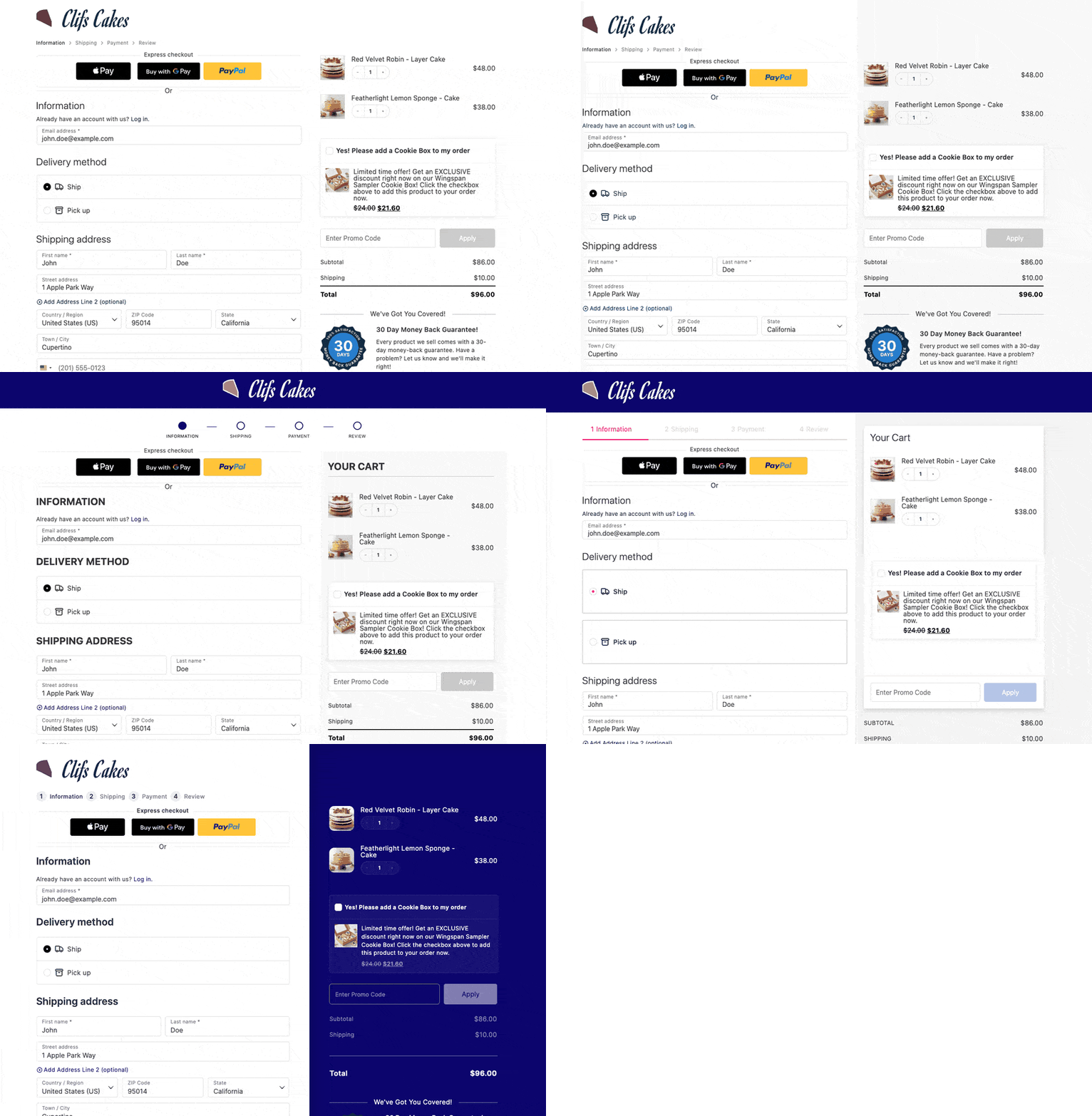
Customizable checkout templates
Skip the page builder. Pick one of five templates, then set your logo, fonts and colors in the Checkout Editor with a live preview.
- Five templates: Midas, Copify, Futurist, Glass and Groove
- Customize logos, fonts and colors
- Every template is optimized for mobile
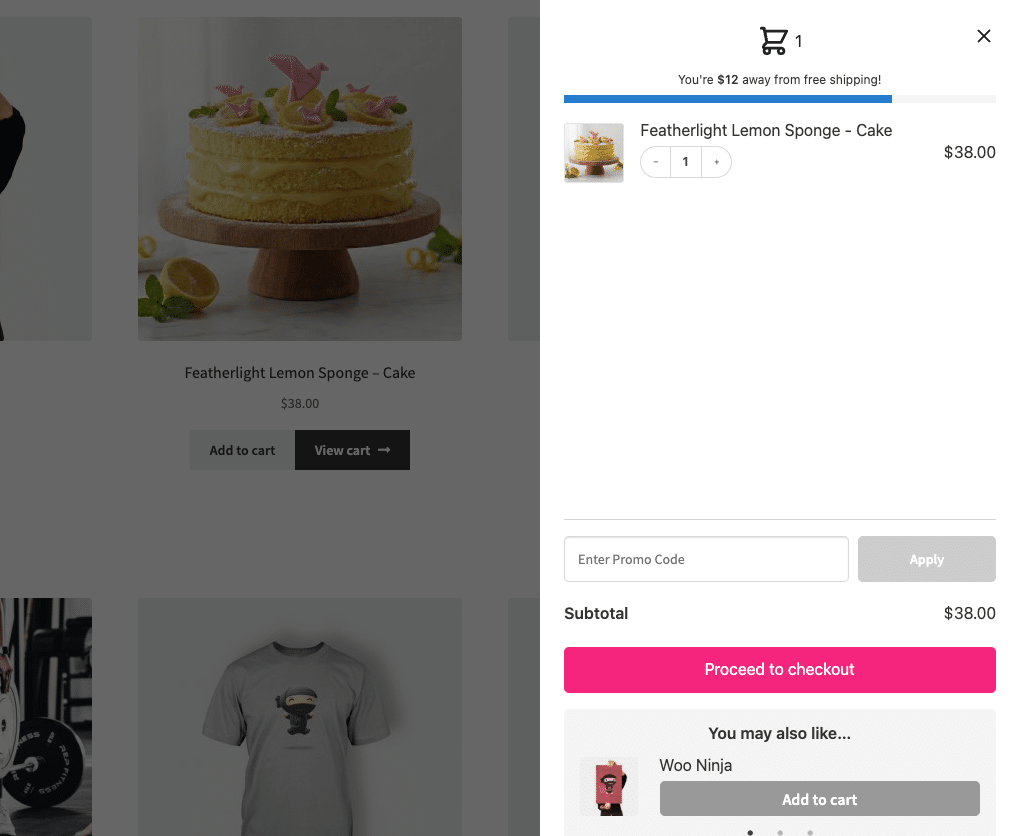
Built-in side cart
Keep shoppers focused on buying with a slide-out side cart. It replaces the cart page, so shoppers go from adding an item to checkout without a detour. Place the floating cart button wherever you need it.
- Free shipping progress bar
- Free gift rewards bar, with up to three spend tiers
- Change quantities and apply discount codes in the cart
- Order bumps and suggested products inside the cart
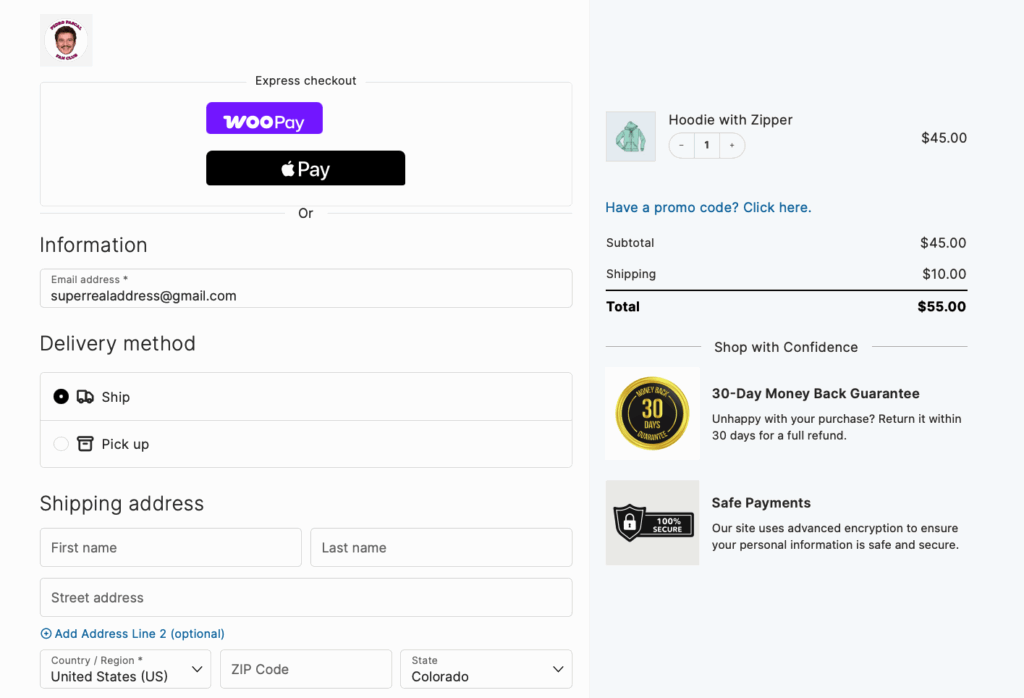
Express checkout buttons
Get customers to the finish line faster with Apple Pay, Google Pay, PayPal and Amazon Pay buttons at the top of checkout, and in the side cart when your gateway supports it. CheckoutWC places the buttons your payment gateway provides.
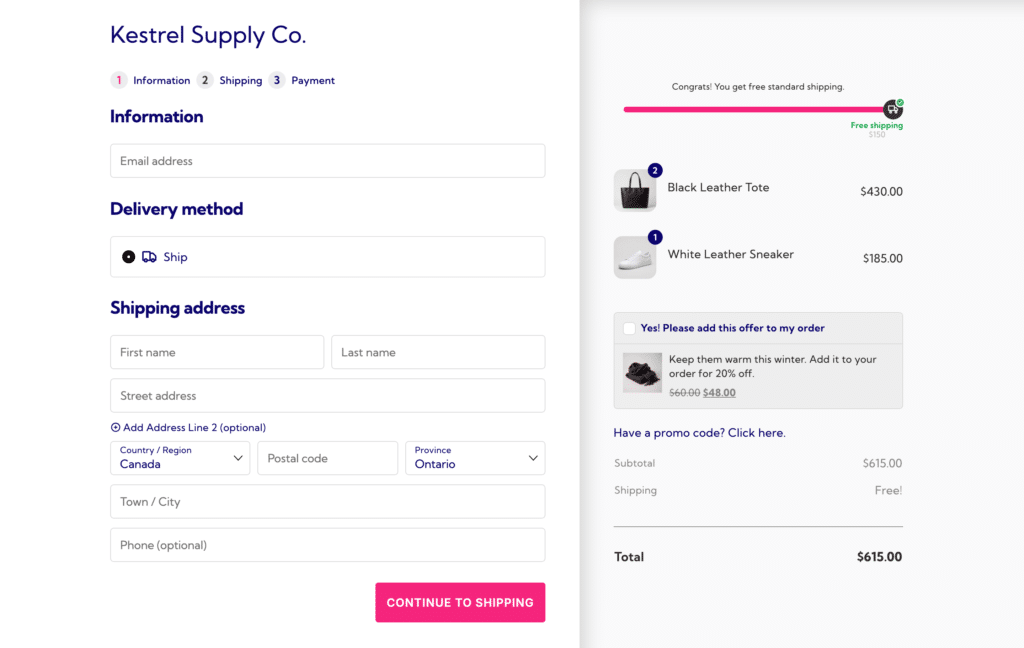
Order bumps that convert
Show the right offer at the right time, based on the products in the cart, their categories or your whole store. Place it in any of 16 checkout positions, in the side cart or in a pop-up as the order is placed, and add a flat or percentage discount.
A/B test your order bumps to see which offer earns more.

Support for WooCommerce Subscriptions
Recurring revenue is one of the fastest ways to grow a store’s value. CheckoutWC works with WooCommerce Subscriptions and add-ons like All Products for WooCommerce Subscriptions. For more flexibility, pair it with Constellation by Kestrel, our membership and subscription toolkit for WooCommerce.
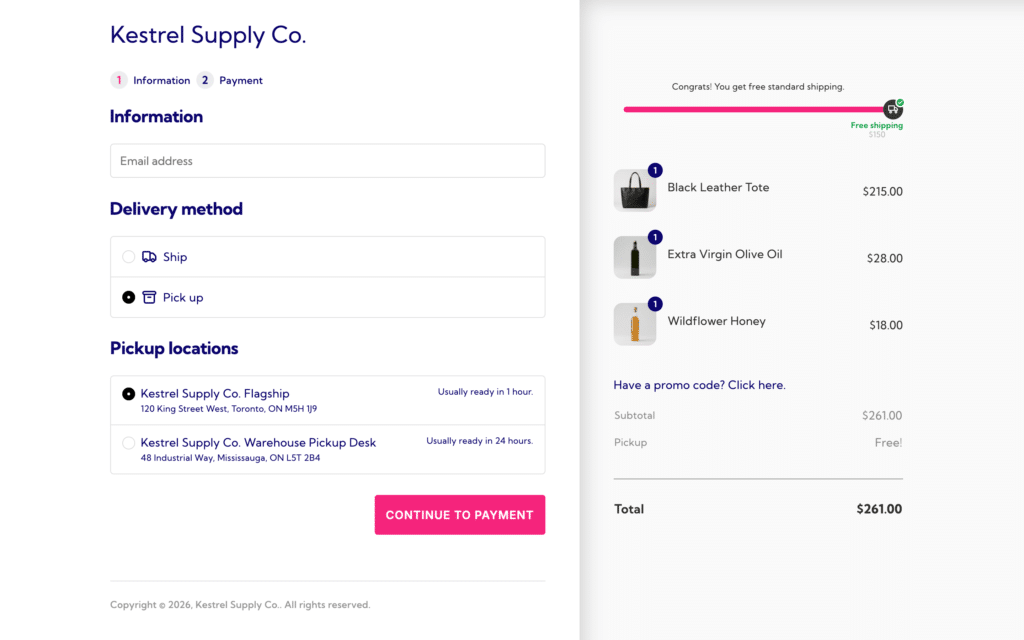
Support for different product types and delivery methods
Selling digital products, shipped items or both? CheckoutWC adapts to what’s in the cart, showing only the fields and steps needed to finish the order.
Offering local pickup? Add your pickup locations, and customers choose pickup or delivery at checkout.
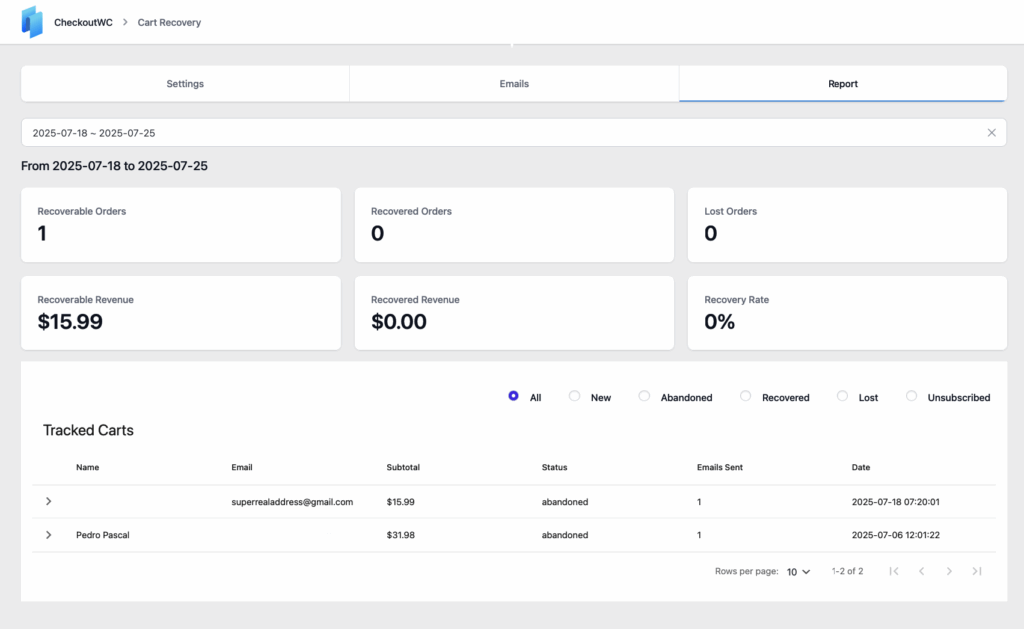
Abandoned cart recovery emails
Win back lost sales with a series of reminder emails on a schedule you set. Add a coupon code to any email and limit it to shoppers with an abandoned cart. The dashboard tracks recovered carts and recovered revenue.
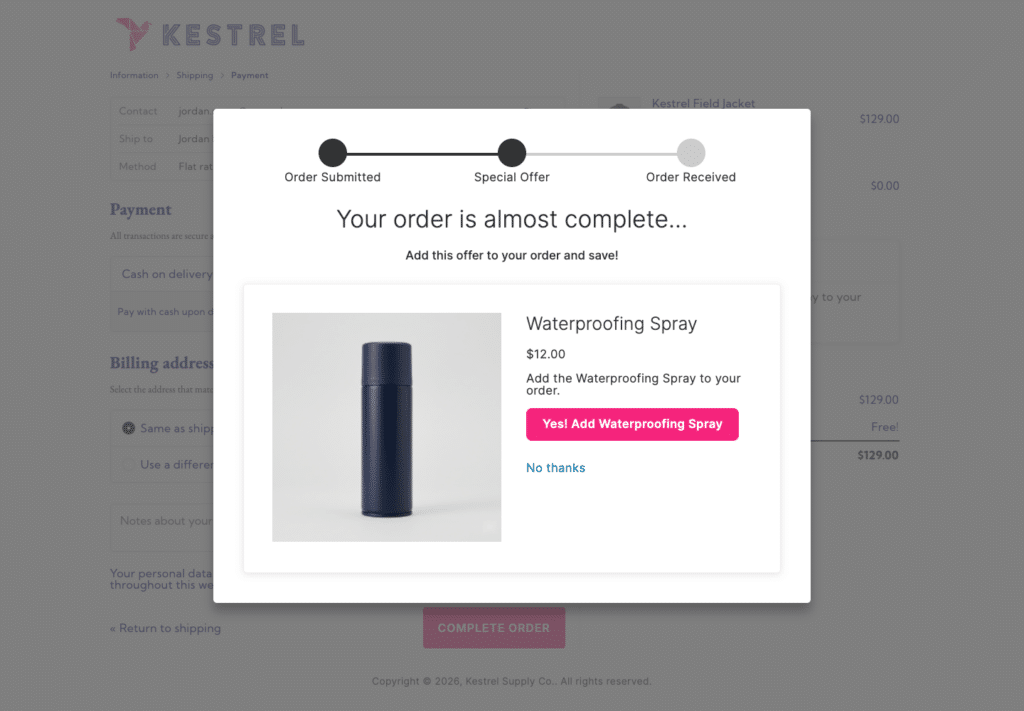
Post-purchase upsells
Put the right offer in front of customers while they’re already buying. Show it in a pop-up when the customer places the order, or on the thank you page after checkout, where a supported gateway (such as Payment Plugins for Stripe or PayPal) adds it to the order in one click.
Offer complementary products, upgrades or limited-time discounts without adding friction to the original purchase.
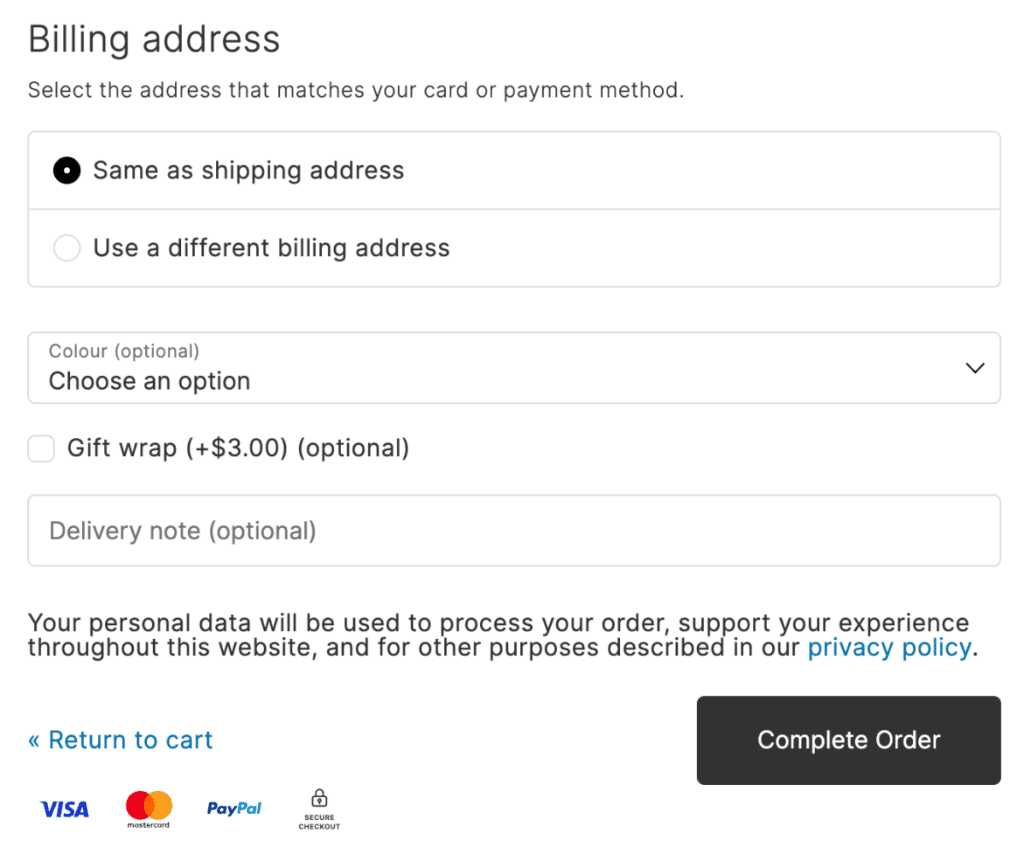
Custom checkout fields with optional fees
Add text, text area, dropdown, radio button and checkbox fields to nearly any part of checkout from the Checkout Editor.
- Charge a fixed or percentage fee, priced per option on dropdowns and radio buttons
- Make a field required, cap its length, or show it only for the carts you choose
- Answers save to the order, the order screen and order emails
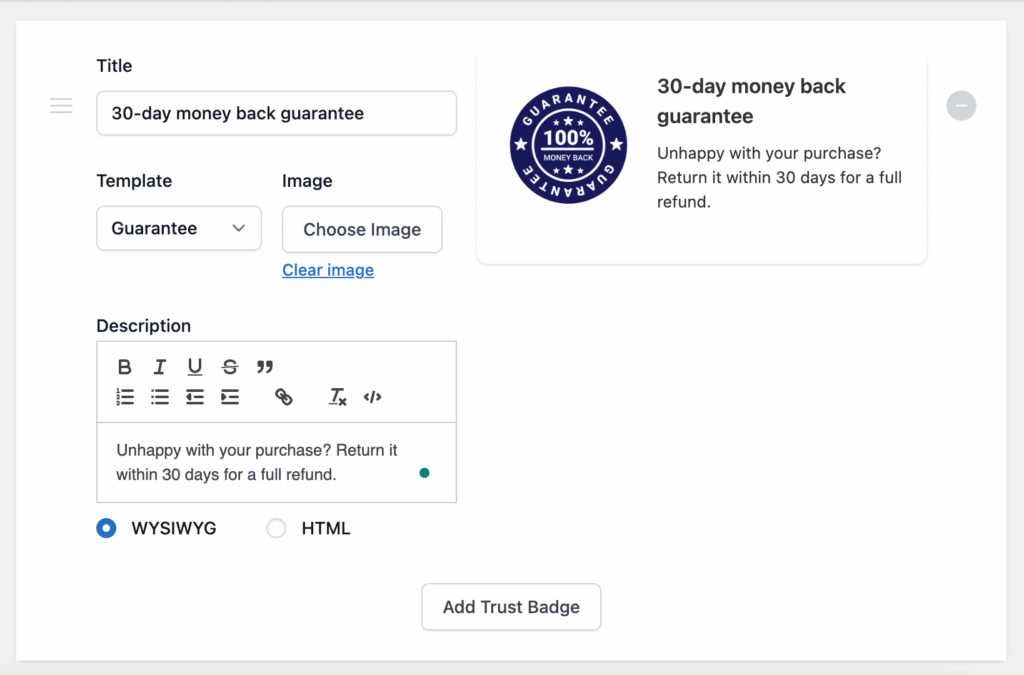
Trust badges and product reviews
Show guarantees, shipping promises and refund policies right where shoppers decide, in any of 16 checkout positions.
- Product reviews as trust badges, from WooCommerce or Reviewbird
- Rows of payment and security icons
- Display conditions, so each badge shows only when it’s relevant
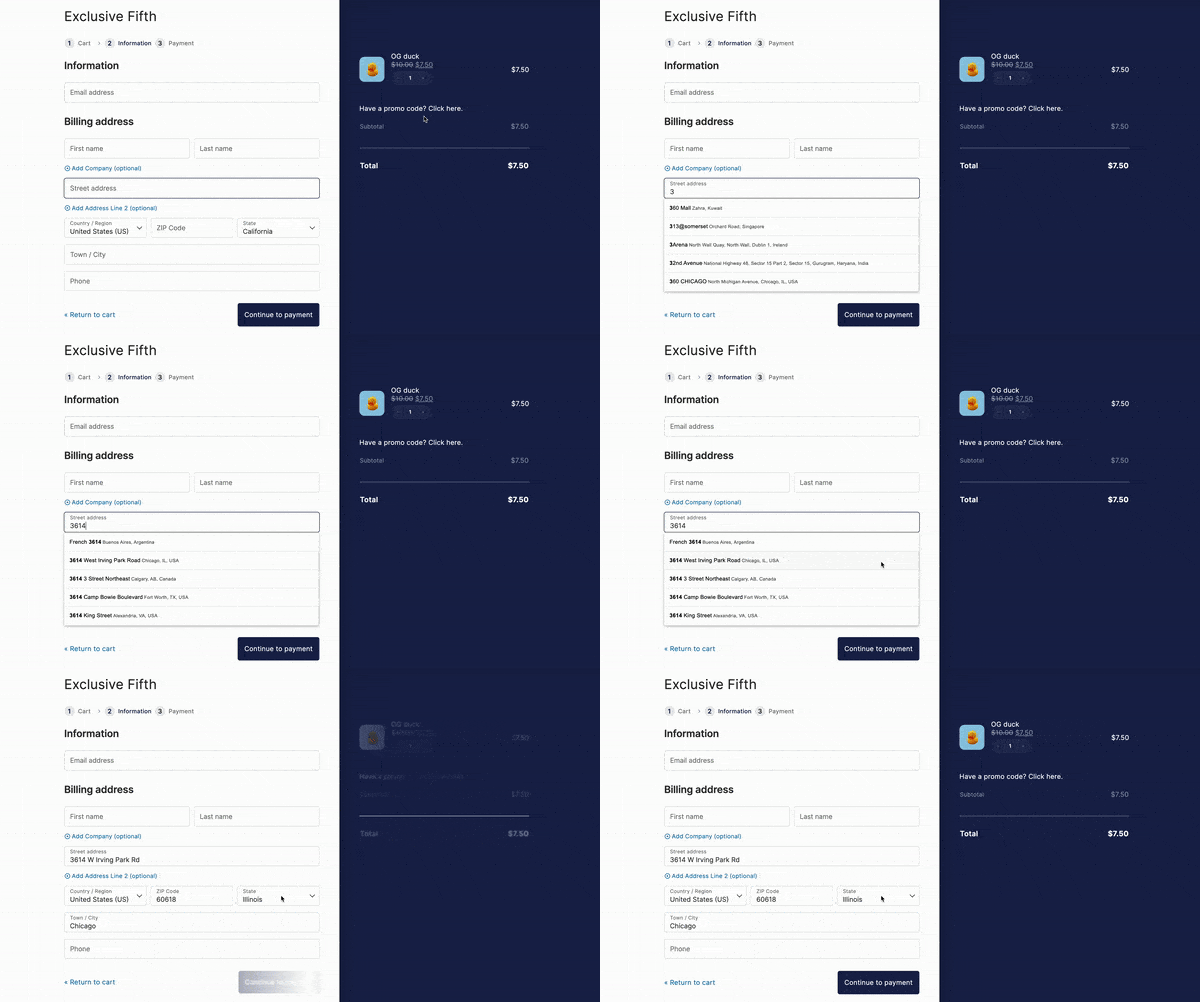
Address autocomplete and validation
Shoppers start typing their address and pick it from a list, with Google Maps or Fetchify autocomplete. Entering a ZIP code fills the state and city.
- Smarty address validation suggests a corrected address before payment
- Uses your own Google, Fetchify or Smarty key

Even more ways to keep customers moving
Every one of these features is built to remove friction and close more sales.
One-page or multi-step checkout
Order review step
Custom checkout fields
ZIP and address autocomplete
Mobile-optimized checkout
Optional full name field
Separate house number and street
Email domain checks
Trust badges
User matching
Distraction-free checkout
Order bump A/B testing
International phone numbers
Cart editing at checkout
Suggested products carousel
Store policies in a pop-up
Free gifts at a spend threshold
Free shipping selected for the shopper
Skip the cart page
Brand settings for each template
Drag-and-drop content slots
Works with block-based checkout pages
Address validation with Smarty
Shorter forms by default
Log in without leaving checkout
Pickup locations with ready times
Floating cart button and cart icon
Product reviews as trust badges
Recovered revenue reporting
20+ languages
About 490 developer hooks
Settings export and import
Every feature on every plan
There are no paid add‑ons. Pay yearly, or pay once. Pick a plan by how many stores you run.
Most popular
1 site
For a single WooCommerce store.
$249 Black Friday: save $99.60
$149.40 first year
Code BF40 applied at checkout. Renews at $249 a year.
30-day refund policy
- One live store
- Free on staging and local sites
- One year of updates and support
- Renews yearly, cancel any time
3 sites
Two more stores for $100 more than 1 site.
$349 Black Friday: save $139.60
$209.40 first year
Code BF40 applied at checkout. Renews at $349 a year.
30-day refund policy
- Up to three live stores
- Free on staging and local sites
- One year of updates and support
- Renews yearly, cancel any time
Pay once
1 site, lifetime
Costs less than four years of the 1 site plan.
$899 Black Friday: save $100
$799 paid once
Code LIFETIMESPECIAL applied at checkout.
30-day refund policy
- One live store
- Free on staging and local sites
- Updates and support included
- No renewal payments
10 sites
For small agencies and multi-store brands.
$499 Black Friday: save $199.60
$299.40 first year
Code BF40 applied at checkout. Renews at $499 a year.
30-day refund policy
- Up to 10 live stores
- Use on client stores
- Move activations between stores
- Free on staging and local sites
25 sites
For agencies with a growing client list.
$899 Black Friday: save $359.60
$539.40 first year
Code BF40 applied at checkout. Renews at $899 a year.
30-day refund policy
- Up to 25 live stores
- Use on client stores
- Move activations between stores
- Free on staging and local sites
50 sites
Everything in 25 sites, with hands-on help.
$1,499 Black Friday: save $599.60
$899.40 first year
Code BF40 applied at checkout. Renews at $1,499 a year.
30-day refund policy
- Up to 50 live stores
- Onboarding call and priority support
- Quarterly check-in with our developers
- Early access to new features
- 30-day refund policy
- Free on staging and local sites
- Reminder two weeks before renewal
- 20+ languages
Questions before you buy
You’ve got questions, we’ve got the answers.
Most WooCommerce stores lose 20–30% of orders at checkout. CheckoutWC is built on years of ecommerce research and user testing to remove the friction that causes cart abandonment. Many merchants see double-digit conversion lifts within days.
You can be live in minutes. Install the plugin, choose a template, and your checkout is ready. No code required, unless you want to customize.
Yes. CheckoutWC is battle-tested with thousands of stores and designed to play nicely with the plugins and themes serious merchants rely on. If you run into any issues at all, our support team will help you get it fixed fast.
Your plan renews automatically, but you’re free to cancel anytime. If your license expires, CheckoutWC templates will be turned off and your site will simply switch back to your theme’s default templates.
CheckoutWC is built for speed and optimized to load as fast — or faster — than WooCommerce’s default checkout. Faster pages mean higher conversions, so performance is a core part of everything we build.
Yes! CheckoutWC works with virtually all WooCommerce-compatible payment gateways out of the box. On the rare chance you hit a snag, our team will make sure it works for your store.
No. CheckoutWC automatically detects staging and development sites, so they never count toward your license activations.
We currently translate CheckoutWC into over 20 languages. Don’t see yours? Tell us, we’re happy to add it.
Yes, 100% for 30 days. If you’re not happy with CheckoutWC for any reason, let us know within 30 days of purchase and we’ll refund you in full. No questions asked.
We’re confident CheckoutWC delivers the best checkout experience for WooCommerce, with thousands of stores seeing higher conversions, but you can try it risk-free and decide for yourself.
Making the world a better place one WooCommerce checkout at a time and one support request at a time.